









Top 10 Funny Background Ideas for Zoom, Teams, and More

Remote work has made video meetings a daily routine for many, but that doesn’t mean they have to feel dull. Virtual meeting backgrounds are an easy way to inject personality into your calls, break the ice with coworkers, and make long meetings a little more enjoyable. Whether you’re aiming for subtle humor or full-on absurdity, a funny background can help you stand out while still keeping things professional enough for work.
With so many platforms now in play, it’s easier than ever to use the same custom background across your meetings. And with the customization tools available in our Photo Editor, creating a funny meeting background takes just a few minutes – even if you’ve never designed one before!
Below, we’ll cover sizing tips and steps to make your own, as well as plenty of funny virtual meeting background ideas you can customize to fit your sense of humor.

Virtual Meeting Background Size Guidelines
Most video meeting platforms use similar background dimensions, which makes designing one background that works everywhere pretty straightforward. While exact specs can vary slightly, a 16:9 aspect ratio is the safest choice for platforms such as Zoom, Teams, Google Meet.
A canvas size of 1920 × 1080 pixels works well across the board and ensures your background looks crisp on larger screens. If you’re starting with an image that’s smaller or not the right shape, our Photo Editor makes it easy to resize, crop, or upscale your design so it fits cleanly without losing quality.
How to Create a Funny Meeting Background Using BeFunky
You don’t need an elaborate setup to create a funny virtual background. In most cases, simple edits are all it takes.
Start by opening your background image in the Photo Editor, then navigate to the Edit tab. Here, you’ll find plenty of tools to help you perfect your background’s size, ratio, and quality.
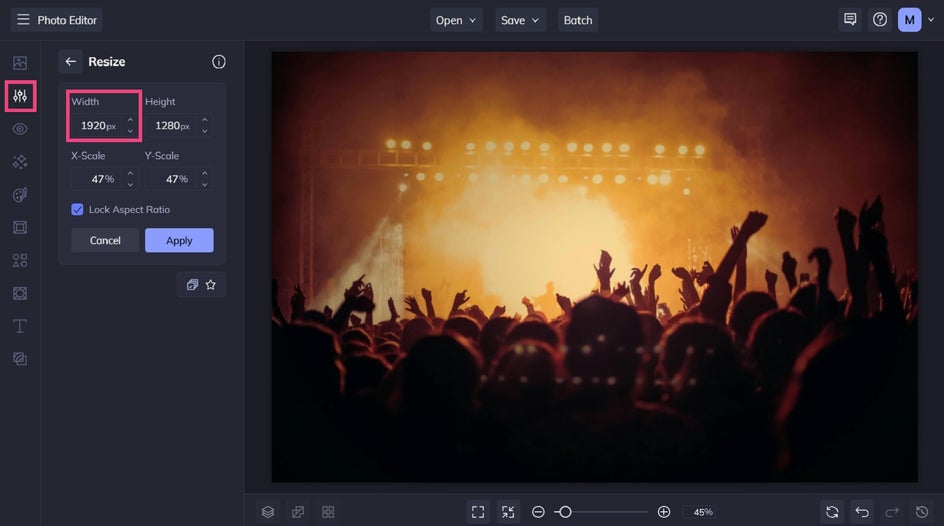
Resize your image to 1920 pixels wide and use the Crop tool to select a portion of your image measuring 1920 x 1080 pixels (16:9 ratio).
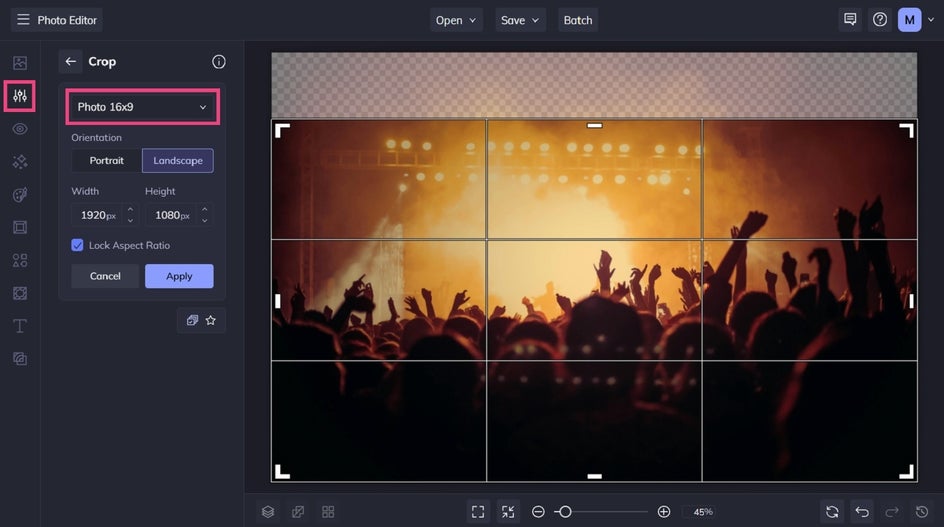
Once you’re happy with the result, save your background as a JPG or PNG. You can then upload it directly to your preferred meeting platform and reuse it across calls.
Just be sure to test your background before a meeting to help you catch any awkward crops or low-resolution images.
It’s also worth considering your audience. What works for a team catch-up might not be right for a client presentation. Having a few different backgrounds saved gives you flexibility depending on the meeting.

10 Funny Virtual Background Ideas to Try
Looking for some inspiration? Check out these funny virtual background ideas for Zoom, Slack, and more.
1. The “Totally Professional” Office
Use an over-the-top corporate office image – think marble floors, floor-to-ceiling windows, or an unrealistically fancy boardroom. The contrast between the background and your actual setup is what makes this one so funny.

2. Work From the Beach
Palm trees, ocean views, and a perfect sunset instantly set a humorous tone. This background works especially well for casual meetings or end-of-week calls when everyone’s counting down to the weekend.

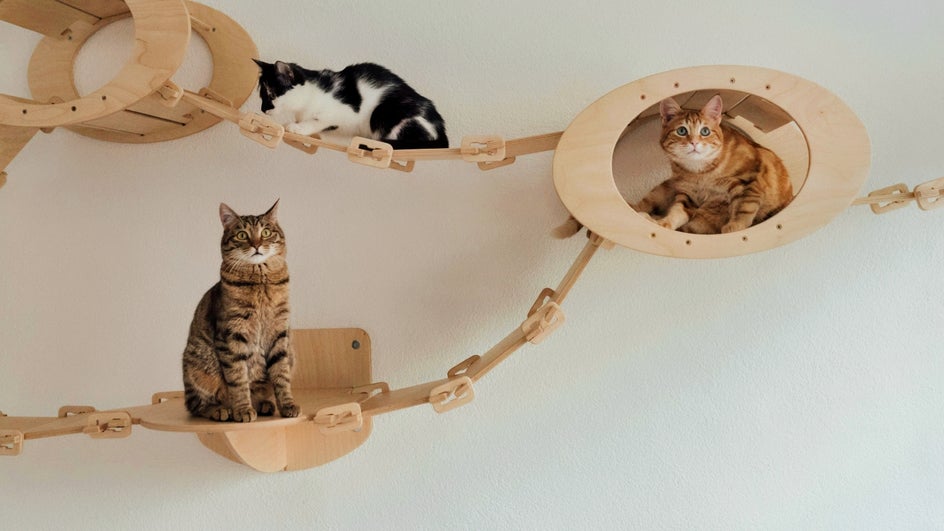
3. Pet Takeover
Fill your background with photos of pets, whether they’re your own or pulled from our Stock Photo Library. Bonus points if it looks like they’re “watching” the meeting with you.
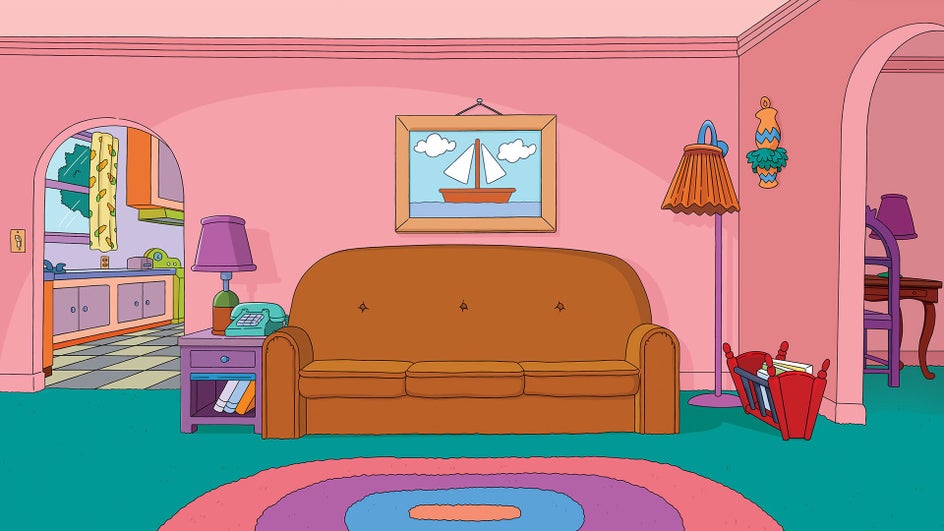
4. Famous TV Scene
Drop yourself into an iconic TV scene, whether it’s the Simpson’s lounge room, the water fountain from Friends, or the iconic Judge Judy courtroom. Keep it light-hearted and recognizable so the joke lands quickly.
5. Fake Home Renovation
Create the illusion that you’re calling in from a heavily unfinished room. Exposed brick, construction equipment, or half-painted walls make it look like you’re in the middle of a renovation.

6. “It’s the Only Place I Get a Signal”
This background leans into the classic remote-work excuse. A bathroom, laundry room, stairwell, or other unlikely space becomes the “only spot with reception,” instantly setting a humorous tone. It works especially well when you’re supposedly on vacation or working from somewhere with questionable Wi-Fi.

7. You’re Being Watched
This background plays on the idea that you’re not entirely alone on the call. A partially hidden person peeking from behind a door, curtain, plant, or piece of furniture adds an unexpected (and funny) moment without being distracting. It’s the kind of joke people notice a few seconds in, which makes it even better.

8. Movie Set
This virtual background makes it look like you’ve joined the meeting from the middle of a film shoot. Think cameras rolling, crew members in the background, lighting rigs, or a clapperboard just out of frame. The humor comes from the idea that you’ve wandered onto a movie set and are casually taking your meeting as an actor or extra.

9. Black-Tie Interruption
This background makes it look like you’ve briefly stepped away from a black-tie event to take your meeting. Think grand ballrooms, chandeliers, formal dinner tables, or an elegant masquerade scene happening just behind you. The contrast between everyday work talk and an over-the-top setting is what makes this one so funny.

10. Seasonal Humor
Why not lean into the time of year with themed backgrounds? Think cozy chaos during the holidays, exaggerated spring scenes bursting with flowers and fields full of lambs, or spooky offices for Halloween. Nothing like a jump scare to start off a meeting!

Make Video Meetings More Enjoyable With Fun Backgrounds
Funny virtual backgrounds are a small detail that can make a big difference in your day-to-day work. With our Photo Editor, you can design custom meeting backgrounds that feel personal, polished, and easy to reuse across all of your video chat platforms.
Explore the Photo Editor to start creating backgrounds that bring a little extra personality to your next meeting – no design experience required!




